


Saturday, August 9, 2014
Computer cooling systems
1. Air cooling system:- Air cooling is done by use of normal fans and exhaust fans to throw the heat out of the system. Fans can be connected to GPUS, CPUS, Power Supply Units (PSU's), chip-sets, hard drives etc.
>For laptops :- If internal fans do not solve our problem of excessive laptop heating during playing high-end games, doing graphics intensive work , then we can buy external cooling pads.

For desktop computers:- We can install extra fans wherever necessary.

Motherboards have extra fan connectors for installing fans in future.

2. Water cooling system:- This technique should be considered when air cooling is not so effective. Water cooling systems is used in data center and in industries to cool down power plants. For pcs it is a do it yourself (DIY) technique and doesn't come pre installed. Circulating water in pipes keeps the components cool.

3. Heatsinks :- It is the best method to prevent computer components from overheating. In electronic systems, a heat sink is a passive heat exchanger that cools a device by dissipating heat into the surrounding medium (wiki). CPUs, GPUs and chipsets have preinstalled heatsinks.

4. Liquid nitrogen cooling:-
As liquid nitrogen boils at -196 °C, far below the freezing point of water, it is valuable as an extreme coolant for short overclocking sessions.
In a typical installation of liquid nitrogen cooling, a copper or aluminum pipe is mounted on top of the processor or graphics card. After the system has been heavily insulated against condensation, the liquid nitrogen is poured into the pipe, resulting in temperatures well below -100 °C.

Note:- Please don't copy and paste.
Wednesday, August 6, 2014
7 Must have softwares for a web developer
1. Browser: Mozilla Firefox
Web Developer tool of Mozilla Firefox is very good. Another advantage is Firefox is fully open source. You will find many plugins and addons for Firefox than any other browser.
The Web Console of Firefox:
- logs information associated with a web page: any network requests, JavaScript, CSS, and security errors and warnings, as well as error, warning, and informational messages explicitly logged by JavaScript code running in the page context
- enables you to interact with a web page by executing JavaScript expressions in the context of the page.

GreaseMonkey addon:
Customize the way a web page displays or behaves, by using small bits of JavaScript.

2. Server : xampp server
XAMPP is a free and open source cross-platform web server solution stack package, consisting mainly of the Apache HTTP Server, MySQL database, and interpreters for scripts written in the PHP and Perl programming languages.

LAMP is an acronym for an archetypal model of web service solution stacks, originally consisting of largely interchangeable components: Linux, the Apache HTTP Server, the MySQL relational database management system, and the PHP programming language. As a solution stack, LAMP is suitable for building dynamic web sites and web applications. Installation on a Microsoft Windows operating system is known as WAMP.

3. JAVA :
Java allows you to play online games, chat with people around the world, calculate your mortgage interest, and view images in 3D, just to name a few.It allows you to run java enabled apps and javascript in your browser.
4. IDE:-
NetBeans IDE
The Smarter and Faster Way to Code
Quickly and easily develop desktop, mobile and web applications
with Java, HTML5, PHP, C/C++ and more.
with Java, HTML5, PHP, C/C++ and more.
NetBeans IDE is FREE, open source, and has a worldwide community
of users and developer.
of users and developer.

ECLIPSE :- Eclipse is an integrated development environment (IDE). It contains a base workspace and an extensible plug-in system for customizing the environment. Written mostly in Java, Eclipse can be used to develop applications. By means of various plug-ins, Eclipse may also be used to develop applications in other programming languages: Ada, ABAP,C, C++, COBOL, Fortran, Haskell, JavaScript, Lasso, Natural, Perl, PHP, Prolog, Python, R, Ruby (including Ruby on Railsframework), Scala, Clojure, Groovy, Scheme, and Erlang. It can also be used to develop packages for the softwareMathematica. Development environments include the Eclipse Java development tools (JDT) for Java and Scala, Eclipse CDT for C/C++ and Eclipse PDT for PHP, among others.

5. EDITOR:- NOTEPAD ++
Notepad++: a free source code editor which supports several programming languages running under the MS Windows environment.

6. BOOTSTRAP:-
Bootstrap, a sleek, intuitive, and powerful mobile first front-end framework for faster and easier web development.

7. ADOBE DREAMWEAVER:-

Repair Your Pendrive
Error 1: Pendrive not showing the actual size on formatting also.
Sometimes when you format your pen drive , it doesn't show the correct capacity of pen drive e.g. it might show 2 MB space on a 8 GB pen drive. This problem can be corrected by again partitioning your pen drive . Sometimes it might be useful to correct write protected devices. Follow below methods step by step:-

> Press WIN+R . Run dialogue box will appear.
> Type CMD and press ENTER.
> On command prompt , type DISKPART.
i.e.
C:\> Diskpart
DISKPART> list disk
DISKPART> select disk (id)
DISKPART> online disk (if the disk is not online)
DISKPART> attributes disk clear readonly
DISKPART> clean
DISKPART> convert mbr (or gpt)DISKPART> create partition primary
DISKPART> select part 1DISKPART> active (if this is the boot partition)DISKPART> format fs=ntfs label=(name) quickDISKPART> assign letter (letter)
DISKPART> list volume
DISKPART> select disk (id)
DISKPART> online disk (if the disk is not online)
DISKPART> attributes disk clear readonly
DISKPART> clean
DISKPART> convert mbr (or gpt)DISKPART> create partition primary
DISKPART> select part 1DISKPART> active (if this is the boot partition)DISKPART> format fs=ntfs label=(name) quickDISKPART> assign letter (letter)
DISKPART> list volume
>Leave steps written in color when using pendrive.
The following are common errors displayed if you miss a step:
DISKPART> clean
DiskPart has encountered an error: The media is write protected.
See the System Event Log for more information.
DiskPart has encountered an error: The media is write protected.
See the System Event Log for more information.
Resolution: run "attributes disk clear readonly" before trying to clean the volume and create the partition.
DISKPART> convert mbr
Virtual Disk Service error:
The specified disk is not convertible. CDROMs and DVDs
are examples of disks that are not convertable.
The specified disk is not convertible. CDROMs and DVDs
are examples of disks that are not convertable.
Resolution: clear all data off the disk before converting by running the clean command.
DISKPART> create partition primary
Virtual Disk Service error:
There is not enough usable space for this operation.
Virtual Disk Service error:
There is not enough usable space for this operation.
Resolution: run "clean" before trying to create the partition.
DISKPART> format fs=ntfs quick
Virtual Disk Service error:
The volume is not online.
Virtual Disk Service error:
The volume is not online.
Resolution: online the disk, create the partition, and convert to mbr before formatting.
The following are common errors displayed if there is a hardware problem:
DISKPART> clean
DiskPart has encountered an error: The device is not ready.
See the System Event Log for more information.
DiskPart has encountered an error: The device is not ready.
See the System Event Log for more information.
Resolution: If the event log entry states "The driver detected a controller error on \Device", the problem is likely your storage controller on your mainboard. Check your hard drive connections and reload your storage conroller driver. If the event log entry states "VDS fails to write boot code on a disk during clean operation. Error code: 80070015@02070008", the hard drive itself has failed.
The following are common errors you may see if there is a hardware problem:
DISKPART> clean
DiskPart has encountered an error: The media is write protected.
See the System Event Log for more information.
DiskPart has encountered an error: The media is write protected.
See the System Event Log for more information.
Resolution: Running "attributes disk clear readonly", as mentioned above, is the first step. Next, the disk is may be locked by an active process, in which case a reboot generally clears the error.
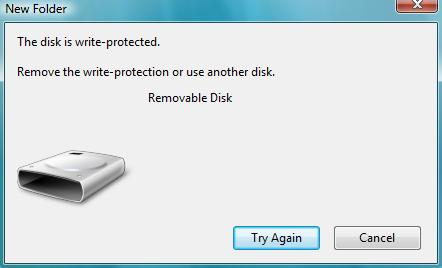
Error 2: The Disk is write protected.
Method 1:- 1. Shutdown your computer or laptop
2. Insert USB Memory Stick into your laptop or Computer 3. Turn on laptop and then immediately start pressing (F8) key then Advanced Boot Options screen will come up
4. Select Safe Mode with Command Prompt
5. After loading files if your USB Memory Stick drive letter is (G) for example then write as
6. C:\windows\system32>G: and press enter
7. G:\>format G: and press enter
8. If ask you (Y/N) then press (Y) and press enter
9. Now a full format will start which remove write protection from USB Memory Stick.
Note: Before removing USB from your computer, Always remove it safely by going into to my computer then right click on USB and click eject.
Method 2:- 1.Type, "Run" and then type "Regedit" and click okay.


2. Navigate to :
HEKY LOCAL MACHINE\System\CurrentControlSet\Control\StorageDevicePolicies\
3.If the above path does not exist, you will want to create the new key and lable it "StorageDevicePolicies" from within the HKEY Local Machine\System\CurrentControlSet\Control\ path.
4. Next, under StorageDevicePolicies, you will want to find or create a DWORD (32-bit) that says, "writeprotect" and ensure that its value is set to "0".
5. Close out of regedit, remove your USB key and reconnect it. After you eject it and reconnect your USB key and after you modify the registry accordingly, you should be able to access your USB key again to copy the data off and the subsequently format the drive.
Saturday, August 2, 2014
Cloud computing
In this post we are
going to know detail about cloud OSes, cloud storage. There will also be a
comparison between different cloud storage services.
Definition:- Cloud computing is a type of
computing that relies on sharing computing
resources rather
than having local servers or personal devices to handle applications.
In cloud computing, the word cloud (also phrased as
"the cloud") is used as a metaphor for "the Internet," so the phrase cloud computing means "a type of Internet-based computing,"
where different services — such as servers,
storage and applications —are delivered to an
organization's computers and devices through the Internet.
Due to the cost of buying and
maintaining mainframes, an organization wouldn't be able to afford a mainframe
for each user, so it became practice to allow multiple users to share access to
the same data storage layer and CPU power from any station. By enabling shared
mainframe access, an organization would get a better return on its investment in
this sophisticated piece of technology.

We run various applications, games , videos, pics, on our pc,
laptops, tablets and mobiles. These apps and games are stored on the device
itself. In cloud computing all these things we can store in cloud. This
promotes security to a new level.
A cloud service has three distinct
characteristics that differentiate it from traditional hosting. It is sold on
demand, typically by the minute or the hour; it is elastic -- a user can have
as much or as little of a service as they want at any given time; and the
service is fully managed by the provider (the consumer needs nothing but a
personal computer and Internet access). Significant innovations in
virtualization and distributed computing, as well as improved access to
high-speed Internet and a weak economy, have accelerated interest in cloud
computing.
History:-
- Cloud computing Concept emerged in the late sixties.
- The idea of an "intergalactic computer network" was introduced in the sixties by J.C.R. Licklider, who was responsible for enabling the
development of ARPANET (Advanced Research Projects Agency Network) in
1969.
- A couple decades later in the 1970s, IBM released an
operating system called VM that allowed admins on their System/370
mainframe systems to have multiple virtual systems, or "Virtual
Machines" (VMs) on a single physical node.
- In 1998 VPS Hosting became available – this web host
improved by having partial infrastructure demand and resource size flexibility.
1997 brought Dedicated Hosting, both managed and unmanaged. This type of
automated computing had dedicated servers with promises of full
administrative access.
- The 2000s was when automated computing became closer to
what is known as “cloud” today. It came in the form of Grid/Utility
Computing and had full infrastructure demand and multi-tenant, partial
resource size flexibility and automated provisioning.
- One of the first milestones in cloud
computing history was the arrival of Salesforce.com in 1999, which
pioneered the concept of delivering enterprise applications via a simple
website. The services firm paved the way for both specialist and
mainstream software firms to deliver applications over the internet.
- The next development was Amazon Web Services in 2002, which provided a suite of cloud-based services including storage, computation and even human intelligence through theAmazon Mechanical Turk. Then in 2006, Amazon launched its Elastic Compute cloud (EC2) as a commercial web service that allows small companies and individuals to rent computers on which to run their own computer applications.

Cloud computing is a general term for anything
that involves delivering hosted services over the Internet. These services are
broadly divided into three categories: Infrastructure-as-a-Service (IaaS), Platform-as-a-Service (PaaS) and Software-as-a-Service (SaaS).
IaaS :- Infrastructure as a Service is a provision
model in which an organization outsources the equipment used to support
operations, including storage, hardware, servers and networking components. The
service provider owns the equipment and is responsible for housing, running and
maintaining it.
PaaS :- Platform as a Service (PaaS) is a way to rent
hardware, operating systems, storage and network capacity over the Internet.
The service delivery model allows the customer to rent virtualized servers and
associated services for running existing applications or developing and testing
new ones.
SaaS :- Software as a Service (SaaS) is a software
distribution model in which applications are hosted by a vendor or service
provider and made available to customers over a network, typically the
Internet.
SECaas:- Security as a service (SECaaS)
is a business model in which a large service provider integrates their security
services into a corporate infrastructure on a subscription basis more cost
effectively than most individuals or corporations can provide on their own,
when total cost of ownership is considered. These security services often
include authentication, anti-virus, anti-malware/spyware, intrusion detection,
and security event management, among others.
Characteristics
:-
Cloud computing
exhibits the following key characteristics:
- Agility improves with users' ability to re-provision technological infrastructure resources.

- Application
programming interface (API) accessibility to software that enables
machines to interact with cloud software in the same way that a
traditional user interface (e.g., a computer desktop) facilitates
interaction between humans and computers. Cloud computing systems
typically use Representational State Transfer (REST)-based APIs.
- Cost: cloud
providers claim that computing costs reduce. A public-cloud delivery model
converts capital expenditure to operational expenditure. This
purportedly lowers barriers to entry, as infrastructure is typically
provided by a third party and does not need to be purchased for one-time
or infrequent intensive computing tasks. Pricing on a utility computing
basis is fine-grained, with usage-based options and fewer IT skills are
required for implementation (in-house).The e-FISCAL project's
state-of-the-art repository contains several articles looking into
cost aspects in more detail, most of them concluding that costs savings
depend on the type of activities supported and the type of infrastructure
available in-house.
- Device and
location independence enable users to access systems using a web
browser regardless of their location or what device they use (e.g., PC,
mobile phone). As infrastructure is off-site (typically provided by a
third-party) and accessed via the Internet, users can connect from
anywhere.
- Virtualization technology
allows sharing of servers and storage devices and increased utilization.
Applications can be easily migrated from one physical server to another.
- Multitenancy enables
sharing of resources and costs across a large pool of users thus allowing
for:
- centralization of
infrastructure in locations with lower costs (such as real estate,
electricity, etc.)
- peak-load
capacity increases (users need not engineer for highest possible
load-levels)
- utilisation and
efficiency improvements for systems that are often only 10–20%
utilised.
- Reliability improves
with the use of multiple redundant sites, which makes well-designed cloud
computing suitable for business continuity and disaster
recovery.
- Scalability
and elasticity via dynamic
("on-demand") provisioning of resources on a
fine-grained, self-service basis in near real-time (Note, the VM startup time varies by VM
type, location, os and cloud providers), without users having to engineer
for peak loads.
- Performance is
monitored, and consistent and loosely coupled architectures are
constructed using web services as the system interface.
- Security can
improve due to centralization of data, increased security-focused
resources, etc., but concerns can persist about loss of control over
certain sensitive data, and the lack of security for stored
kernels.Security is often as good as or better than other traditional
systems, in part because providers are able to devote resources to solving
security issues that many customers cannot afford to tackle. However,
the complexity of security is greatly increased when data is distributed
over a wider area or over a greater number of devices, as well as in
multi-tenant systems shared by unrelated users. In addition, user access
to security audit logs may be difficult or impossible. Private
cloud installations are in part motivated by users' desire to retain
control over the infrastructure and avoid losing control of information
security.
- Maintenance of
cloud computing applications is easier, because they do not need to be
installed on each user's computer and can be accessed from different
places.

Cloud Solutions:-
1. Cloud storage and the
cloud collaboration:-
- Cloud storage is a model of networked enterprise storage where data is
stored in virtualized pools of storage which are generally hosted by third
parties.
- Before cloud file sharing
and collaboration software, most collaboration was limited to more
primitive and less effective methods such as email and FTP among
others. These did not work particularly well, and so the need emerged
for a simple to use, yet feature rich cloud collaboration solution.
- Hosting companies operate
large data centers, and people who require their data to be hosted buy or
lease storage capacity from them. The data center operators, in the
background, virtualize the resources according to the
requirements of the customer and expose them as storage pools, which the
customers can themselves use to store files or data objects. Physically,
the resource may span across multiple servers and multiple locations. The
safety of the files depends upon the hosting companies, and on the
applications that leverage the cloud storage.
- Cloud storage services
may be accessed through a web service application programming
interface (API) or by applications that utilize the API, such as
cloud desktop storage, acloud storage gateway or Web-based content
management systems.

The best cloud collaboration tools:
- Use real-time
commenting and messaging features to enhance speed of project delivery
- Leverage presence
indicators to identify when others are active on documents owned by
another person
- Allow users to
set permissions and manage other users' activity profiles
- Allow users to
set personal activity feeds and email alert profiles to keep abreast of
latest activities per file or user
- Allow users to
collaborate and share files with users outside the company firewall
- Comply with
company security and compliance framework
- Ensure full
auditability of files and documents shared within and outside the
organization
- Reduce
workarounds for sharing and collaboration on large files.
Below list gives the
best top 20 cloud storage services and file hosting services:-


more.. sugarsync, ubuntuone, mozy, mimedia, cx
....

2. Cloud OS:-
With a Cloud
operating system (also known as a Web OS), you can manage your office
work, prepare projects, etc quite similar to how you do on your desktop. The beauty of the idea is that everything is stored on the
Internet and hence available everywhere you go!
ZeroPC offers you 1GB of free storage and lets you to connect
cloud storage services like Box, DropBox, Google Drive, SkyDrive, SugarSync and
4Shared for access to your paperwork. ZeroPC is also available on the Android,
iPhone and iPad, giving you access while on the go.
For photo lovers, it is also a great "photo management tool", linking photo & video services like Facebook, Flickr, Instagram, PhotoBucket, Picasa and Recood. Plus, it also has native apps for instant messaging, a text editor as well as productivity tools for managing documents and spreadsheets online.
For photo lovers, it is also a great "photo management tool", linking photo & video services like Facebook, Flickr, Instagram, PhotoBucket, Picasa and Recood. Plus, it also has native apps for instant messaging, a text editor as well as productivity tools for managing documents and spreadsheets online.
Jolicloud offers you Joli OS, which you can download and install
in your system (even if it’s 10 years old) or use it in the browser. Joli OS
provides you with the full cloud experience – keep and use your favorite apps
any time, any where. Jolicloud has over 15,000 web apps you can access using
the system.
You can integrate your
DropBox and Google Drive accounts with Jolicloud and there is also a ‘Jolicloud
Me’ version where you can manage all of your online life at a single place
Jolicloud Me currently supports Facebook, Flickr, Instagram, Picasa, Tumblr and
Twitter.

Glide OS is a good choice if you’re collaborating for a group
project. Glide team offers 30GB of free storage and you can add a total of 6
users in your account. The OS is not very pretty but is quite useful; it has
additional features like email and profiles as well as basic tools like
Calendar, Notes, Text editor, Presentation maker, etc required for your
paperwork.

Glide also provides a syncing software for Windows, Mac OS and
Linux so that you can easily sync your files between Glide HD (they call it the
Glide Hard Disk) and your local storage. They also have browser extensions and
a mobile version.
SilveOS is a cloud operating system built on Silverlight. You
can run it in any browser with Silverlight installed. It has many built-in apps
which let you write, listen to music, make notes, and even play Solitaire. You
can also install Silverlight apps from the web in SilveOS.
It, however, doesn’t provide any storage so it’s not the best
Cloud OS for long term work. But it’s a handy tool if you often work on
computers that is not yours like the office computer or at cyber cafes.
iSpaces has only the basic features for you to manage your work
like Browser, File manager, Notes, Office suite (Zoho office), etc. It also has
3 Workspaces accessible from the task bar. t lets you keep your working
environments organized with quick access from one Workspace to the other.
You can work on your files from Box and DropBox using
the file manager. iSpaces has a simple environment for you to access your files
on Box and DropBox in the same view, and you can move your files from
one space to another just by drag and drop. The changes will be reflected in
your respective cloud storage accounts.
Although in beta stage, Cloudo is an interesting operating
system built to run in your browser. It is packed with apps like Mail,
Calendar, Audio Player, RSS reader, Contact manager, Word processor, Notepad,
Command Line Interpreter, Finder (to search files) etc. It provides a good interface
like an operating system where you can run commands, install apps, play music
etc.
It handle multi-tasking quite efficiently and let you do your
tasks efficiently. It also offers an Application Manager which you can use to
install more apps in your Cloudo.
xOS doesn’t provide a lot of customization options but they do
provide a good collection of apps for personal use. It offers Web browser, File
manager, Text editor, Notes, Calendar, Paint, Email client, and Canvas Rider (a
bicycle game) among others.
ZimDesk is a cloud operating system full of apps and features.
It has got Custom wallpapers, Office Suite, Contact Manager, RSS reader,
Calendar, Mail client, FTP client, File uploader and manager etc.
It’s an another cloud operating system which offers basic apps
like Radio, Calendar, File manager, Bookmark manager, Notes, Email client, etc.
You can add web apps to it as links which will be opened in new tabs. It also
supports Instant messaging between its users.
CloudOS is an open-source set of
software services written in KRL and running on the Kinetic
Rules Engine.
CloudLinux has been a key component to Funio's success since day
one. Combined with CageFS, it has helped in terms of server stability by
preventing the "bad neighbor effect" while increasing overall server
security and density. Installing CloudLinux on a shared-hosting server
instantly makes it more reliable and more secure without having to invest much
effort.
amoebaOS
is an advanced Online Operating System. Log in to your free account and join a
cloud computing revolution that begins with great apps like Shutterborg,
Exstream and Surf.
14. myGoya
myGOYA
is a free online operating system. Your own personal desktop can be accessed
from any Internet PC in the world and includes e-mail, chat, filesharing,
calendar and an instant messenger. Manage your contacts from anywhere in the
world.
Ghost
Cloud Computing is a leading company in the cloud computing industry
specializing in cloud computing for the end user. Ghost offers individuals and
businesses file storage and apps in the cloud to enable secure personal
computing from any device. Ghost is distributed directly from its web site and
through channels. Ghost web interface is very simple and easy to use, it make
it quick and easy to manage your files and folders. You can upload data of any
type to your cloud storage from any device. You can view and edit any of your
files in any browser.
You can
instantly share files and documents with any friend by sending them a link.
Wherever you are, you can edit documents and pictures directly online within
Ghost portal. It also offers full mobile support, you can browse your file and
folders from your cellular device or you can mount as a Windows drive; just
like a USB flash drive. You can move files between local hard disk and your
Cloud File.
16. eyeOS

eyeOS
is one of the most used WebOSes which is released under the AGPLv3 license and
only needs Apache + PHP5 + MySQL to run. With eyeOS you can build your private
Cloud Desktop. Using eyeOS Web Runner you can open your eyeOS files
from your browser with your local apps and save them automatically on your
cloud. In eyeOS 2.0 you can work collaboratively with other users
simultaneously in the same document, it is the Safe Cloud Computing system
because you can host it in your own company or organization. You will get
privacy and cloud computing at its best.
17. Zimdesk
ZimdeskOS
is your computer on the web – the entire functionality of a PC – online. There
is nothing to install. A web browser and internet connection are all you need
to access your desktop, files and favourite applications. You can access your
data anytime from anywhere, from any PC.
Lucid
comes with lots of applications. You can browse photos, listen to music, and
edit documents. It also comes with an RSS feed reader, some games, a
calculator, and a bash-like terminal application. You can install additional
third-party applications, which allows you do do even more!
Not only does it look great, has pretty much any application you
might need, but also offers up to 50GB of online storage, easy sharing, and an
application development feature.
Corneli
OS is another operating system besides JoliCloud which is available to download
on your computer. It includes set of applications such as user manager, file
manager, a Content Management System (CMS) and a database management system. It
can be installed on LAMP servers and is available as free Open Source software
under the GPL. It offers a Multi-user system experience and has a Virtual file
system (VFS). You can also use Corneli OS (CIOS) to build other web
applications and social networks. It is a kind of operating system that will
appeal to IT professionals and developers.
..................................................................................................................................
Subscribe to:
Posts (Atom)
Popular Posts
-
 7 Must have softwares for a web developer 1. Browser: Mozilla Firefox Web Developer tool of Mozilla Firefox is very good. Another...
 -
What would you explain linked list to a person? Consider a linked list to be a train where Engine is the head and you have flexibility t...
-
The word "traverse" means "to go or travel across or over". Uses of traversal:- If we want to modify each of the ...
-
 Cloud computing In this post we are going to know detail about cloud OSes, cloud storage. There will also be a comparison between diff...
 -
 Errors in computer world 1. Programming errors While writing c programs, errors also known as bugs in the world of programming may occ...
 -
 LINKED LIST IN C :- List means a sequence of items arranged one after another. A linked list is a data structure con...
 -
 DETECT AUDIO ON YOUTUBE You might have seen people commenting on a video commenting-"2:42 song please or which music is at x:xx. B...
 -
 Repair Your Pendrive Error 1: Pendrive not showing the actual size on formatting also. Sometimes when you format your pen drive , i...
 -
 Computer cooling systems 1. Air cooling system:- Air cooling is done by use of normal fans and exhaust fans to throw the heat out of th...
 -
 TOP TEN GAMES SUPPOSED TO HAVE BEST GRAPHICS This is top ten graphics game that have stunning visuals and graphics. Some of these games ...
